Sprite sheets for 2D games
You will make: eight sheets of a walking character, one per compass direction, plus every frame as its own PNG. Time: 5 minutes.
-
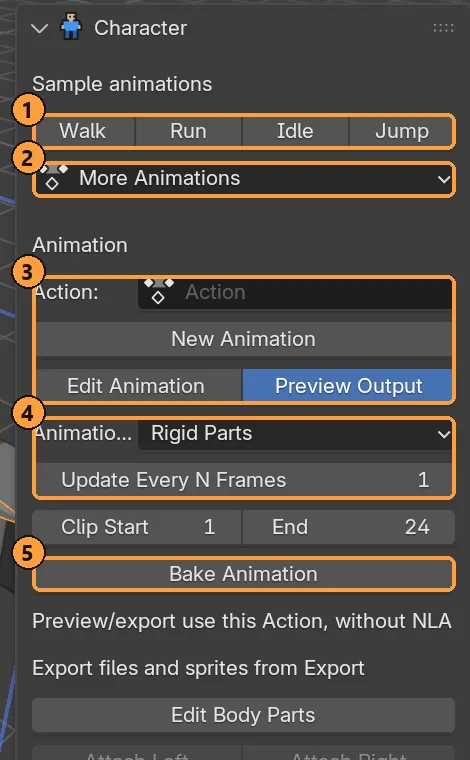
Rig a character and pick a clip, for example Walk.
-
In Character (④ below), set:
- Animation Output: Strict Grid, for cubes that never tilt, like hand-drawn pixel art. Rigid Parts works too.
- Update Every N Frames: 2, for a stepped, classic feel.
-
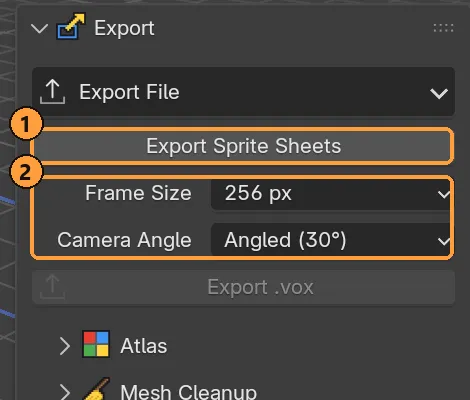
Open Export and set:
- Frame Size: anywhere from 64 px, for a tiny sprite, up to 1024 px.
- Camera Angle: Level (0°) for side-scrollers, Angled (30°) for classic three-quarter games, Top-Down (60°) for top-down games.
-
Click Export Sprite Sheets ① and pick a folder.
You get a new animation_sprites folder containing:
- one sheet per direction;
- every frame as a transparent PNG;
- a JSON file with frame timing and the pivot, so your engine can place the feet.
The 24-frame Walk sample, for example, becomes a sheet of six columns and four rows per direction. An existing sprite folder is never overwritten.