Export to a game engine
Time: 5 minutes per engine.
A static prop
Section titled “A static prop”- Select the voxel model. Object Mode is fine.
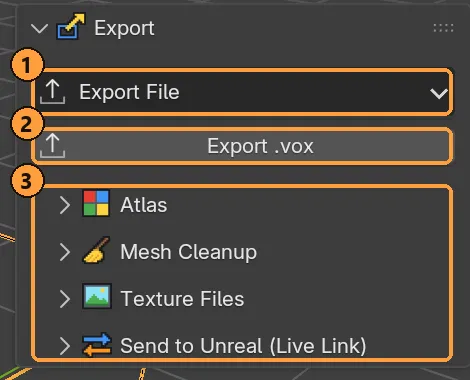
- Choose Export ▸ Export File ▸ Godot (or Unity, Unreal, glTF or FBX).
- Choose a file name. Keep Bake Atlas on.
What you get:
| Geometry | Merged faces, interior faces removed |
| Material | One material with one atlas texture, plus optional ORM and emission maps |
| Scale and axes | Set for that engine: metres and Y up for Godot and Unity, centimetres for Unreal |
Import the file in the engine. It should arrive standing up, at the size you modelled, with its colours.
An animated character
Section titled “An animated character”- Rig the character (see the biped or animal tutorial) and pick the clip in Action.
- Set the output mode to Rigid Parts (Skin for slimes).
- Select the rig, the model or the preview. Any of them exports the whole character.
- Choose Export ▸ Export File ▸ your engine.
The file carries the armature, the mesh skinned to it, and the selected clip with its frame stepping. Export once per clip you need.
Strict Grid can’t go to FBX or glTF, because the mesh changes every frame. Use sprite sheets or render it instead.
Unreal, without files
Section titled “Unreal, without files”With the Voxel Mode Unreal plugin in your project, Export ▸ Send to Unreal (Live Link) pushes the model straight into the open editor: skeletal mesh, skeleton and animations, named with your prefixes. See Export.